“Marbles is like having a jazz musician who never plays the same solo twice, but always stays in the pocket.” - Anonymous Eurorack user
Overview
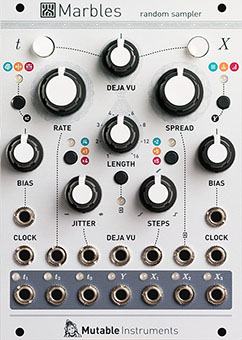
Marbles is an 18HP Eurorack module that generates random gate patterns and control voltages with user-controllable probability distributions and looping behavior. The module consists of two independent generators: the t section for rhythm generation and the X section for voltage generation, plus a DÉJÀ VU system that controls pattern repetition and variation.
t Generator (Rhythm Section)
The t section produces randomized gate patterns from a master clock, outputting three independent trigger streams: t1, t2, and t3.
Rate and Range Controls
RATE knob [A] - Sets the master clock speed. With no external clock connected, 12 o’clock position equals approximately 120 BPM. CV input available for voltage control of rate.
RANGE switch [B] - Three positions that divide or multiply the clock by a factor of 4:
- Low: Clock divided by 4 (slower rhythms)
- Middle: Normal clock rate
- High: Clock multiplied by 4 (faster rhythms)
Jitter Control
JITTER knob [C] - Controls timing variation of the master clock:
- Fully counterclockwise: Stable, precise timing
- 12 o’clock: Subtle humanization (slight timing fluctuations)
- Fully clockwise: Complete chaos with unpredictable timing
CV input available for voltage control of jitter amount.
Clock Distribution Modes
MODE button [E] - Cycles through three methods for splitting the master clock into t1, t2, and t3 outputs:
Mode 1 - Coin Toss: At each clock pulse, a random decision sends the gate to either t1 or t3. The BIAS control determines the probability (50/50 at center, biased toward t1 or t3 when turned). t2 outputs every pulse regardless.
Mode 2 - Random Ratios: t1 and t3 receive clock divisions or multiplications at randomly selected ratios. Rhythmically independent from each other.
Mode 3 - Alternating Pattern: Creates kick/snare-style alternating patterns between t1 and t3, with variations controlled by BIAS.
Bias Control
BIAS knob [D] - Function changes depending on MODE:
- Mode 1: Probability distribution (t1 vs t3)
- Mode 2: Range of random divisions/multiplications
- Mode 3: Variation amount in alternating pattern
Gate Length Adjustment
Hold the MODE button [E] while adjusting BIAS to set gate length (duty cycle) for t1 and t3:
- Fully counterclockwise: 1% duty cycle (short triggers)
- 12 o’clock: 50% duty cycle
- Fully clockwise: 99% duty cycle (nearly continuous gates)
Hold MODE and adjust JITTER to add randomization to gate length.
Note: t2 always maintains 50% duty cycle and is not affected by gate length controls.
External Clocking
When a clock signal is connected to the RATE CV input, the internal oscillator is replaced by the external clock. The RATE knob then functions as a clock divider/multiplier control instead of a speed control.
t Generator Outputs
t1 - First trigger output, affected by BIAS and gate length controls
t2 - Second trigger output, fires on every clock pulse, 50% duty cycle
t3 - Third trigger output, affected by BIAS and gate length controls
All outputs are compatible with standard Eurorack gate/trigger levels.
X Generator (Voltage Section)
The X section generates three independent random control voltages: X1, X2, and X3. Each output is clocked by a corresponding t output (X1 follows t1, X2 follows t2, X3 follows t3).
Output Range
RANGE switch [J] - Selects the voltage range for all X outputs:
- 0-2V: Suitable for subtle modulation
- 0-5V: Standard modulation range
- ±5V: Bipolar, spans positive and negative voltages
LED indicator shows current range selection.
Spread Control
SPREAD knob [K] - Controls the distribution width of random voltages:
- Fully counterclockwise: All voltages cluster tightly around center (minimal variation)
- 12 o’clock: Uniform distribution across full range
- Fully clockwise: Voltages favor extreme low and high values (bimodal distribution)
CV input available for voltage control of spread.
Bias Control
BIAS knob [L] - Skews the probability distribution toward low or high voltages:
- Fully counterclockwise: Favors low voltages
- 12 o’clock: Centered distribution
- Fully clockwise: Favors high voltages
Unlike a simple offset, BIAS maintains the distribution shape while shifting probability.
CV input available for voltage control of bias.
Steps (Quantization)
STEPS knob [M] - Controls quantization and scale reduction:
- Fully counterclockwise: Smooth, continuous random voltages (no quantization)
- 12 o’clock to fully clockwise: Progressively eliminates notes from a chromatic scale
At maximum (5 o’clock position), only a few notes remain, creating sparse, intervallic melodies.
CV input available for voltage control of quantization.
Channel Diversity Modes
SPREAD button [N] - Cycles through three modes that determine how X1, X2, and X3 relate to each other:
Mode 1 - Independent: All three channels follow the SPREAD, BIAS, and STEPS settings identically.
Mode 2 - Centered/Inverted: X2 remains centered (unaffected by BIAS), while X1 and X3 receive inverted BIAS values.
Mode 3 - Divergent: X3 follows panel controls normally, X1 receives opposite BIAS, X2 remains static at center voltage.
These modes allow complex relationships between the three outputs from a single set of controls.
External Processing Mode
EXTERNAL button [O] - Engages external CV sampling mode. When enabled:
- Module samples incoming voltage from SPREAD CV input instead of generating random values
- RANGE LED turns off (voltages reflect input signal range)
- BIAS functions as a transposition control
- SPREAD controls transposition range
- STEPS applies quantization to incoming signal
This mode transforms Marbles into a CV processor that reshapes existing sequences.
In certain configurations, the module enters shift-register mode where X1, X2, and X3 output delayed, evolving versions of the sampled input.
X Generator Outputs
X1 - First voltage output, clocked by t1
X2 - Second voltage output, clocked by t2
X3 - Third voltage output, clocked by t3
All outputs provide random voltages within the selected range, shaped by SPREAD, BIAS, and STEPS.
Y Generator
The Y output provides an additional smooth random voltage, clocked at 1/16 the rate of X2. Default settings: smooth interpolation, ±5V range.
Hidden Y Controls
Hold the SPREAD button [N] to access Y generator parameters:
- While held, SPREAD adjusts Y spread
- BIAS adjusts Y bias
- STEPS adjusts Y rate divisor (1/64 to 1:1 ratio with X2)
These settings revert when the button is released unless saved.
The Y generator is never affected by DÉJÀ VU settings—it always generates fresh random values.
DÉJÀ VU System
The DÉJÀ VU section controls pattern repetition and looping behavior independently for the t and X sections.
DÉJÀ VU Knob
DÉJÀ VU knob [H] - Controls the probability of recycling previous random values:
7 o’clock to 12 o’clock: Transition from completely random (0% recycling) to locked loop (100% recycling). At exactly 12 o’clock, the LOOP LED blinks to indicate a perfectly repeating pattern.
12 o’clock to 5 o’clock: Loop is locked, but random variations can jump to different points within the loop. Clockwise increases jump probability.
CV input available for voltage control of recycling behavior.
Loop Length
LENGTH switch [I] - Selects loop duration in steps:
- 5 steps
- 7 steps
- 10 steps
- 14 steps
Shorter loops create tighter, more recognizable patterns. Longer loops allow more complexity before repetition becomes obvious.
Section Activation
t button [F] - Enables or disables DÉJÀ VU for the t generator (rhythm section)
X button [G] - Enables or disables DÉJÀ VU for the X generator (voltage section)
These can be activated independently, allowing:
- Repeating rhythm with evolving voltages
- Locked melody over changing rhythm
- Both sections locked
- Both sections random
Scale Programming
Marbles supports user-programmable scales for the STEPS quantizer. Six memory slots store custom scales.
Programming Procedure
- Connect a keyboard CV output to the SPREAD CV input
- Connect keyboard gate output to the CLOCK input
- Hold the EXTERNAL button [O] for 2 seconds (LEDs flash to confirm)
- Play a sequence of notes representing the desired scale (minimum 50 notes recommended)
- Press EXTERNAL button again to finalize
The module analyzes the played frequencies and determines which notes to eliminate as the STEPS knob is turned. This allows custom modes, exotic tunings, or specific pitch collections.
Technical Specifications
- Width: 18HP
- Depth: 25mm
- Power consumption: +12V: 80mA, -12V: 20mA
- Clock range: Approximately 0.06Hz to 100Hz (internal oscillator)
- Voltage outputs: Configurable 0-2V, 0-5V, or ±5V
- Trigger outputs: Standard Eurorack gate levels
- CV input tolerance: Module handles up to 3ms timing variation between gate and CV
- Firmware: User-updateable via RATE CV input and audio interface
Typical Patching Scenarios
Self-Patching for Global Loops
Patch t2 output to X CLOCK input. This synchronizes the voltage generator to the rhythm generator, creating globally repeating sequences when DÉJÀ VU is engaged for both sections.
Polyrhythmic Generation
Use the three t outputs to clock different modules at related but independent rates. The random divisions create evolving polyrhythms.
Sample-and-Hold Processing
Feed an external oscillator into the SPREAD CV input with EXTERNAL mode enabled. Use BIAS for transposition and STEPS for quantization. The three X outputs provide differently-timed samples of the input.
Melodic Sequencing
Set X RANGE to 0-5V, enable STEPS quantization, program a custom scale, and patch X1 or X2 to an oscillator’s 1V/octave input. Use DÉJÀ VU to create repeating melodic phrases with controllable variation.
Modulation Distribution
Use the three X outputs as related but independent modulation sources. In SPREAD mode 2 or 3, they maintain relationships while providing distinct voltages.
Firmware Updates
The module runs user-updateable firmware. Updates are installed by playing an audio file from a computer into the RATE CV input. Instructions and audio files are available from the Mutable Instruments documentation archive.
Random sources, sample-and-holds, quantizer, rhythm generator, and probability processor in one module.
Based on the Mutable Instruments Marbles manual